Up next in 10



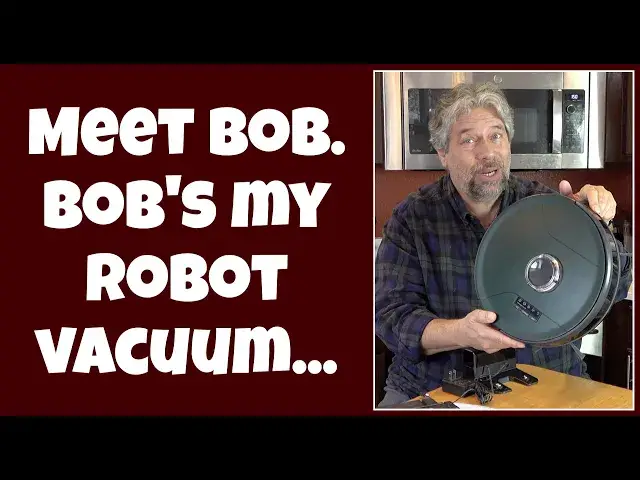
Meet Bob. Bob is my new robot vacuum cleaner and with the power of SLAM (Simultaneous Location and Mapping) technology and LiDAR Bob does a great job of mapping my house and vacuuming - or mopping! - every square inch. Bob's the PetHair SLAM version, however, so he's also ready to tackle pet fur, dust, dirt, and more. Tech expert Dave Taylor walks through all of Bob's major functions and features, with demos and more. Should you invite Bob to help clean your home? Watch and decide!
Check it out at: https://www.Bobsweep.com/
Then visit Dave's Q&A Web site at: https://www.AskDaveTaylor.com/
#bobsweep #vacuum #robot #pethair #slam #lidar #askdavetaylor
Show More Show Less View Video Transcript
0:00
Meet Bob, he helps keep my house clean. Let's check him out. â™
0:11
Dave Taylor here and I'm checking out this. This is the Bobsweep Bob Pet Hair Slam Robot Vacuum Cleaner
0:19
and it's a pretty sophisticated device, even though it just looks like a really big hockey puck
0:25
What it does is it cruises around my house on either vacuums or mops
0:31
and it has very sophisticated software to be able to map everything out
0:36
and figure out optimal routes and do a nice back and forth pattern
0:40
In fact, let's cut to some instant close-up vacuuming. The way it works is it uses something called LIDAR
0:50
which is a laser-based sensor system. It's the same way that autonomous cars work
0:55
It also uses another technology called SLAM, which is in its name
1:00
What's SLAM? How do you not know this? It's Simultaneous Localization and Mapping
1:06
It's a way that it's figuring out where it is and sending out signals
1:10
to figure out and map an entire area. One of the things it does that's really cool is it assigns each room a different color
1:19
In a second, I'll show you what that looks like in the app because it uses an app and that's a really important part of this
1:26
But it also has what they call Turbo Lift Vacuuming, which gives it different suction settings
1:32
You can set it on a quiet mode and that'll give it a little less suction
1:36
but it's a lot more quiet and you can do that while you're watching TV
1:40
It's really pretty quiet. Now, it has two different modes, as I said
1:45
If you put this in, this is the dustbin, and it's a little dusty because I've been using it
1:51
This has a 600-milliliter capacity, but if you don't want to do that and you want to mop
1:57
then you can use this instead. This is the mopping attachment. You can hopefully see there's water in there
2:04
and then there's an actual mop surface on the bottom. You just switch in whichever one you want and that's the one that it will use
2:13
Among the many different things that it comes with is it comes with..
2:19
Actually, before we even get there, let me just show you on the bottom. One of the things that differentiates Bob is that it has two of these edge brushes
2:28
Now, these are really important because the robot itself can't get right up to the edge of a wall and floor
2:35
but the brush can pull little bits back into the center of the room
2:40
which it can then pick up, which works great. So it has two of those
2:44
It has this front wheel. These are for charging. It has the whole vacuum assembly right here
2:51
which it's not going to be using since it's mopping in this mode, so it wouldn't have anywhere to put the dust
2:56
but if you put on this instead, then it'll obviously be picking things up
3:01
Now, one of the other things that's interesting is it has a pretty sophisticated control panel
3:07
This gives you access to a lot of different controls without having to use the app
3:13
It does not come with a remote control like some of these devices, but honestly, you lose the remote control
3:18
So I think 99% of users use the app, but if you can't find your app or you can't find your phone
3:24
or you just want to turn it on, boom, push a button, and it's ready to roll
3:28
And one of the things that Bob comes with is a really good instruction manual with lots of information
3:35
so it's very easy to get started. One of the things I really like is they put a lot of effort into the usability
3:43
So let's see. So it has a separate mopping unit. I've told you about that
3:47
And in the app, you can do scheduling. You can do lots of cool stuff
3:52
Again, I'll show you that in just a second, but I will tell you that this one has the biggest battery on their whole lineup
3:59
It's 3,000 milliamp hours, which gives it two hours of runtime. And if it takes more than two hours to do your floor
4:06
not a worry. It will go back to the base. It'll charge up, and then when it's charged
4:11
it'll actually resume where it stopped. So it's not going to just do the first half of your really big house every time
4:17
It'll do the first half, then the second half, then the first half, then the second half
4:22
And you can also set up no sweep and more sweeps. Sorry, mo sweeps, what they call it, zones
4:28
So you can say, this is the front area right by the door. Do this twice every time you clean this area
4:34
Or you can say, that's the kids' room. Just skip that room entirely
4:38
There's always stuff on the floor. We don't want a mess. So let me go and actually let's have a little more footage of this thing running
4:47
And then we'll actually go and jump into the app, and I'll show you how the app works
4:51
So let's have another look, this time with it mopping. And one of the things I find really an important test is
5:00
how easily can it find its own base station. So here's that footage
5:05
And you can see Bob's pretty smart about finding its base station
5:09
and connecting back up for charging. Now, also in the box is the charging unit and the power plug
5:16
So you're going to want to put this on a hard surface for the most part
5:20
And you'll want to have this probably right on the edge of a wall
5:24
Give it a couple of feet on both sides so it's easier to work with
5:28
And then it comes with four of these little side brushes. So you have an entire extra set, which is really nice
5:36
It comes with this cleaning brush if you find that your house
5:40
has given it some gnarly challenges. And then in the dustbin, there is actually a little filter
5:48
And that's something you're going to want to take out and clean every single time
5:53
And you can just do that by like banging it against the side. But it comes with an extra one, which is great
5:58
because they don't last a long time in a dirty house. And it comes with an extra mop attachment
6:03
So all of that's really great. But what I want to do is I want to actually put this on the floor
6:09
and then let's run through the app and look at some things. So give me a second to set that up
6:14
I switched things up so that it's going to vacuum instead of mopping because I have carpet in addition to hardwood and tile
6:20
So it's going to cover all the areas that way. And I'm in the app. You can see it here on the side
6:26
And it gives you a lot of different controls. In settings, you can get to some cleaning preferences
6:32
where you can turn off the audio. And the low power mode is also another way of saying the quiet mode
6:38
So it's a little bit less vacuumy. Sucky? Sucking? Whatever. But it does a little bit less of the ability to pull out all the dirt
6:49
But the trade-off is it's a lot quieter. I don't really care how noisy it is, so I just let it run
6:54
Edge detection, you can check for software updates, which is important because these devices have a fair number of firmware updates
7:02
I can go and look at my map. You can see that's my main floor on my house
7:07
We'll come back to that in a second. And what I'm going to do is I'm going to choose sweep
7:12
And then, you ready? Let's just go. So can you hear that in the background
7:19
So Bob is about 10 feet away from me. Now let's go into the map
7:25
And the map shows where it is in that little black square
7:30
And as we watch, it will get updates, and it will start mapping and moving around in the space to actually start vacuuming
7:39
And you'll see it'll do a nice even back and forth. Now, you don't want to watch for an hour and a half
7:46
while it slowly and methodically vacuums my floor, so let's speed this section up a bit
7:52
So the first thing you're seeing it do is figure out the edges of the space
7:57
And by doing that, it can then calculate how to be most efficient
8:02
in covering all the square footage of that area. So it's just figuring out my dining room area right now
8:11
So we'll just let it chug along. And now you're starting to see how it methodically goes back and forth
8:18
to cover the entire surface. And that's really important because there are a lot of robot vacuum cleaners
8:25
including earlier generations of Bob, that are more random in their coverage
8:30
They just sort of bounce around like a, I don't know, pinball, and you just hope that they cover all of the square footage
8:36
But this is much better because this is how a human would vacuum
8:40
where we go back and forth, side to side, until we feel like we've vacuumed the entire surface
8:46
Now, the robot's a little bit more patient, so it's going to be doing a much more methodical job
8:52
And you can see it is slowly but surely filling in this entire area
8:56
That's pretty cool. Well, that's about as exciting as it gets in Vacuum Land
9:02
So let's go back to the main screen. And you can see there are some other settings
9:06
You can look at the history of how often it's cleaned and how long it took to do the cleaning
9:11
You can go into a scheduler, and I can specify... Let's see, how did we get here
9:18
I think there's a little hiccup here, but if I go to Schedule and I choose New Cleaning Schedule
9:25
then I should be able to schedule that I want it to come on
9:29
at 2 in the afternoon every day. Looks like there's a slight hiccup because it's actually running
9:35
My guess is let's stop it. And my guess is since it's now not running
9:41
and not actively mapping, that this schedule will work. Nope, that's a bug. They'll fix it
9:47
By the time you check out this app, that will be fixed, but it lets you schedule
9:53
It also lets you hook it up to Google Home or to Alexa. I don't fully understand why you would want that
9:59
but I guess you could say something like, you know, Google, start the vacuum cleaner or something like that
10:05
But again, I'd rather just launch the app and just use this as I need
10:10
So that's pretty much everything I wanted to show you. Let me go ahead and grab Bob and I'll wrap this up
10:17
So give me just another second. So now you've met Bob and it's pretty cool
10:22
I think this is a really great addition to my household. Now, I've tested a lot of robot vacuums
10:28
and one of the things I'll say is it's a little bit smaller than other units, which can be a plus for many households
10:34
but it does mean it has to work a little bit harder, it has to go a little bit back and forth more
10:40
just to get that same coverage. But it is 13 inches by 13 inches by 4 inches tall
10:46
and that 4 inches tall is important because that means it can easily go under beds and under couches and stuff
10:53
And I will say I used to have a pretty bad dust bunny problem under my bed
10:57
and with one of these devices, that is gone. It just, like, doesn't exist anymore
11:02
because they pick up all the dust without me having to move the bed. Super helpful
11:07
Now, it is 6.5 pounds, so it's pretty light, which means you can also just pick it up and move it into another area
11:14
So if you have a multi-story house, you can do it on a floor-by-floor basis
11:18
The app doesn't really let you have multiple maps, but I've just found if you ignore that
11:24
it will just recalculate the map and it'll figure things out. It might be slightly slower than doing the same space again and again
11:31
but who cares if I'm away at work all day and this is chugging along while I'm not home
11:37
I don't really care if it takes 90 minutes instead of 60 minutes
11:41
So, lots to like here. I found that this is a really great device
11:46
It's interesting that they chose to have separate mopping and vacuum bins
11:51
Now, the downside of that is you have to choose which one you want to do
11:55
The upside is that, unlike other devices I have where they're integrated into the same thing
12:01
this has a lot larger water capacity and then, of course, the dustbin has a larger dustbin capacity
12:08
Now, it doesn't have a tower. It doesn't automatically empty itself, which is something you might expect in this price range
12:15
But let's get to the price in just a second. Before we get there, I do want to ask
12:20
if you could subscribe to my channel, click or tap on that subscribe button
12:24
and don't forget to click on that bell icon so you get notifications of new reviews
12:28
and we're connected. Great. Now, this is the Bobsweep Bob Pet Hair Slam Robot Vacuum Cleaner
12:37
It comes in Jet Black or this color, which is Jade Green or Jasper Red
12:42
and it is $899.99 at bobsweep.com. But, before you actually start panicking about that price
12:51
I will tell you, I looked around online and I have found it for less than half of that price
12:58
So, do a little bit of research on Google or Bing or whatever your favorite shopping engine is
13:04
and you might be surprised at what kind of discount you can find for this unit
13:09
Is this a comparable $900 robot vacuum compared to some of the other players in this market
13:15
You know, maybe that's a little bit high priced for what this offers, but if you can get it at a discount
13:20
it can be quite a deal. So, it's definitely one to think about
13:24
If you have a small place, an apartment, a condo, a house
13:29
and you want to put this on one of the floors or even migrate it between floors as needed
13:34
even if it just does a mediocre job, it's better than you doing the vacuuming
13:38
and this does a much better than mediocre job. This does a really nice job and has really good coverage
13:44
foot by foot of every space in my house. So, big fan
13:49
Bob is a very welcome addition to the household. That's all I got. I need to get him back to work
13:53
So, I'll catch you in my next video
#Cleaning Services
#Home Appliances
#Vacuums & Floor Care
#Household Cleaning Supplies